.png)
Send us a quick email with a brief explanation. We will respond and resolve the issue as soon as possible.
Submit ticketTranslate Best Practice & Troubleshooting
Choosing the right mode:
Use Standard as your default for most translation needs
Switch to Annotated when:
Dealing with technical legal terms unfamiliar in the target jurisdiction
Translating key provisions where terminology precision matters
Learning or understanding legal concepts from foreign systems
Working with terms that lack direct equivalents (e.g., common law concepts translated for civil law jurisdictions, or vice versa)
For optimal translation quality:
Provide complete sentences or provisions rather than fragments
For file uploads, ensure documents are legible (especially scanned documents)
If translating specific sections from a long document, paste just those sections as text rather than uploading the entire file
For technical terminology, consider using Annotated mode for initial understanding, then Standard mode for full document
Understanding legal terminology across jurisdictions:
Be aware that some legal concepts don't translate directly (e.g., "trust" in common law, "publicité foncière" in French law)
Annotated mode is particularly valuable for these cross-jurisdictional terminology challenges
Always apply your professional judgment about whether translated legal terms carry the same meaning in different legal systems
Quality control:
Review translation for accuracy and contextual appropriateness
Verify that legal terminology is used correctly in the target language
For critical documents, consider professional verification or certified translation
Check that document structure and formatting are preserved (for file uploads)
Apply your professional judgment — translations are AI-generated and not certified translations
When NOT to use Translate:
Translation combined with legal analysis (use Assistant)
Multi-document translation and comparison (use Assistant)
Translation requiring legal research (use Assistant)
Certified translations for official filings or submissions (consult professional translation services)
Important limitation:
Translations are AI-generated and shall not be considered certified translations. For official court filings, notarized documents, or any purpose requiring certified translation, you must use professional certified translation services.
Output and Copy
Where output appears:
The translation appears in the right panel.
For Standard translation:
Clean, readable translation preserving the structure and legal meaning of the original text.
For Annotated translation:
Translation with explanatory notes on legal terminology, cross-jurisdictional context, and technical terms that require clarification.
Copy:
Click "Copy" to paste the translation into documents, emails, or further analysis.
Download:
Click "Download" to save the translation as a Word document for record-keeping or further use.
Using translations in your workflow:
Use translated content to understand foreign language documents
Incorporate translations into memos or client communications (with appropriate disclaimers)
Use as basis for further legal analysis in the Assistant
Reference in due diligence or transaction work
Compare translated provisions against your templates or standards
Remember: Translations are AI-generated and shall not be considered certified translations. Always exercise your professional judgment and independently verify important information. For official submissions requiring certified translation, consult professional translation services.
Troubleshooting
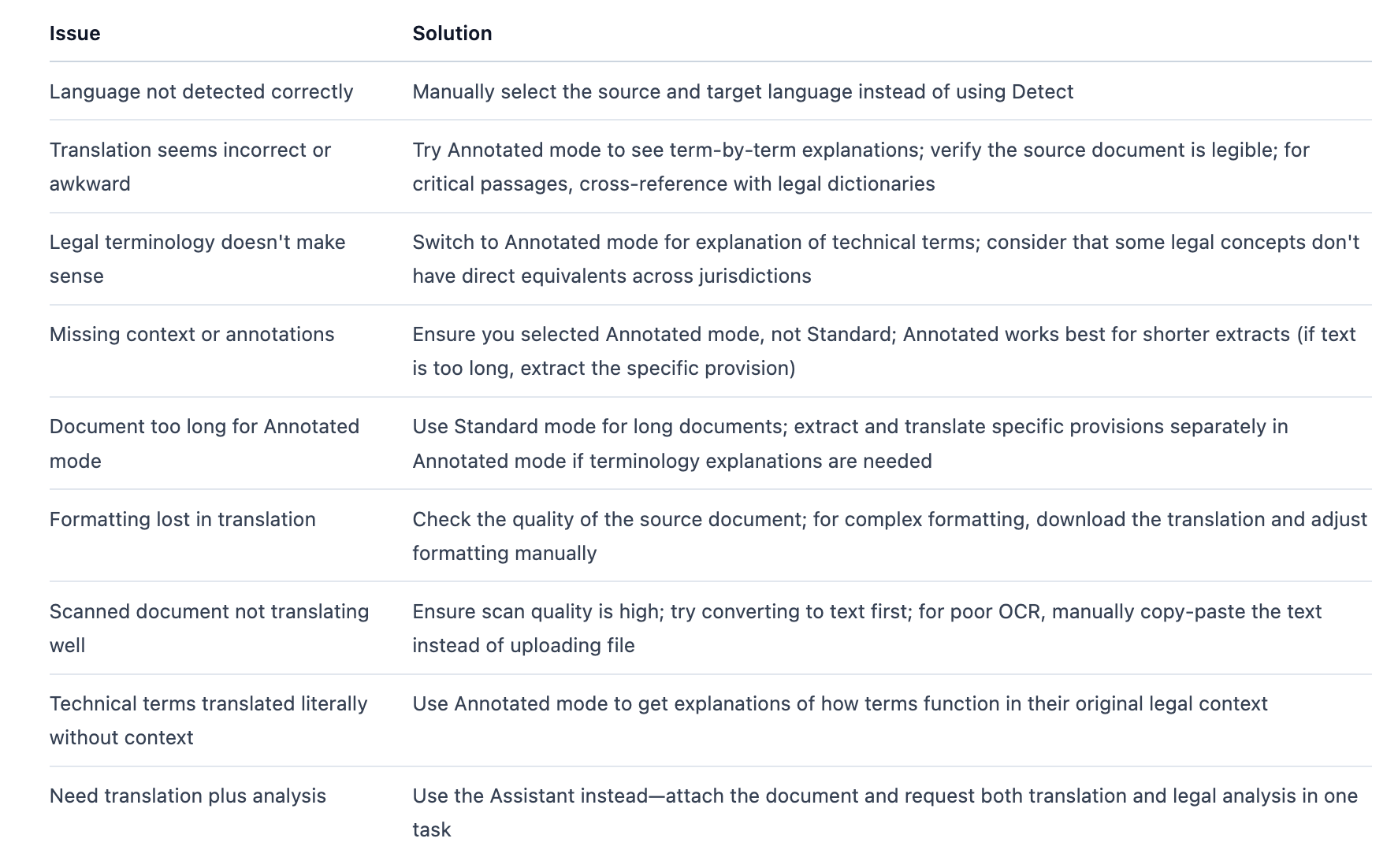
Next steps:
For legal analysis of translated content, copy the translation into an Assistant conversation
For translation combined with document review or compliance analysis, use the Assistant with the original document attached
Save frequently referenced translations to your Library for future use
For certified translations required for official purposes, consult professional certified translation services