.png)
Send us a quick email with a brief explanation. We will respond and resolve the issue as soon as possible.
Submit ticketSimplify Best Practices & Troubleshooting
Document preparation:
Use the highest quality version available
For lengthy documents, consider simplifying specific sections separately
If simplifying a particular clause, section, or finding, you can paste just that text instead of uploading the entire document
Effective instructions:
Specify your audience:* *"For non-legal client" vs. "For lawyer reviewing technical evidence" vs. "For finance team"
Define what they need to understand: "Focus on explaining the technical cause and legal implications"
Provide context for why: "I need to understand the cybersecurity vulnerabilities to assess contract breach"
Quality control:
Always review output for accuracy
Verify that critical technical or legal details are preserved
Check that the terminology is explained correctly for your purpose
Ensure the explanation is appropriate for the stated audience and use case
Apply your professional judgment; the simplified content is AI-generated and not final work product
When NOT to use Simplify:
Condensing or extracting information (use Summarize)
Creating structured summaries or timelines (use Summarize)
Multi-document comparison (use Assistant)
Tasks requiring legal research or analysis beyond explanation (use Assistant)
Simplification requiring external sources or precedents (use Assistant)
Iterative refinement through conversation (use Assistant)
Output and Download
Where output appears:
The simplified content appears in the "Document simplified" panel on the right side of the screen.
Copy and Download:
Click "Copy" to paste the explanation into emails, memos, or other documents
Click "Download" to save the simplified content as a Word document
Remember: Simplified content is AI-generated and shall not be considered final work product. Always exercise your professional judgment and independently verify important information.
Troubleshooting
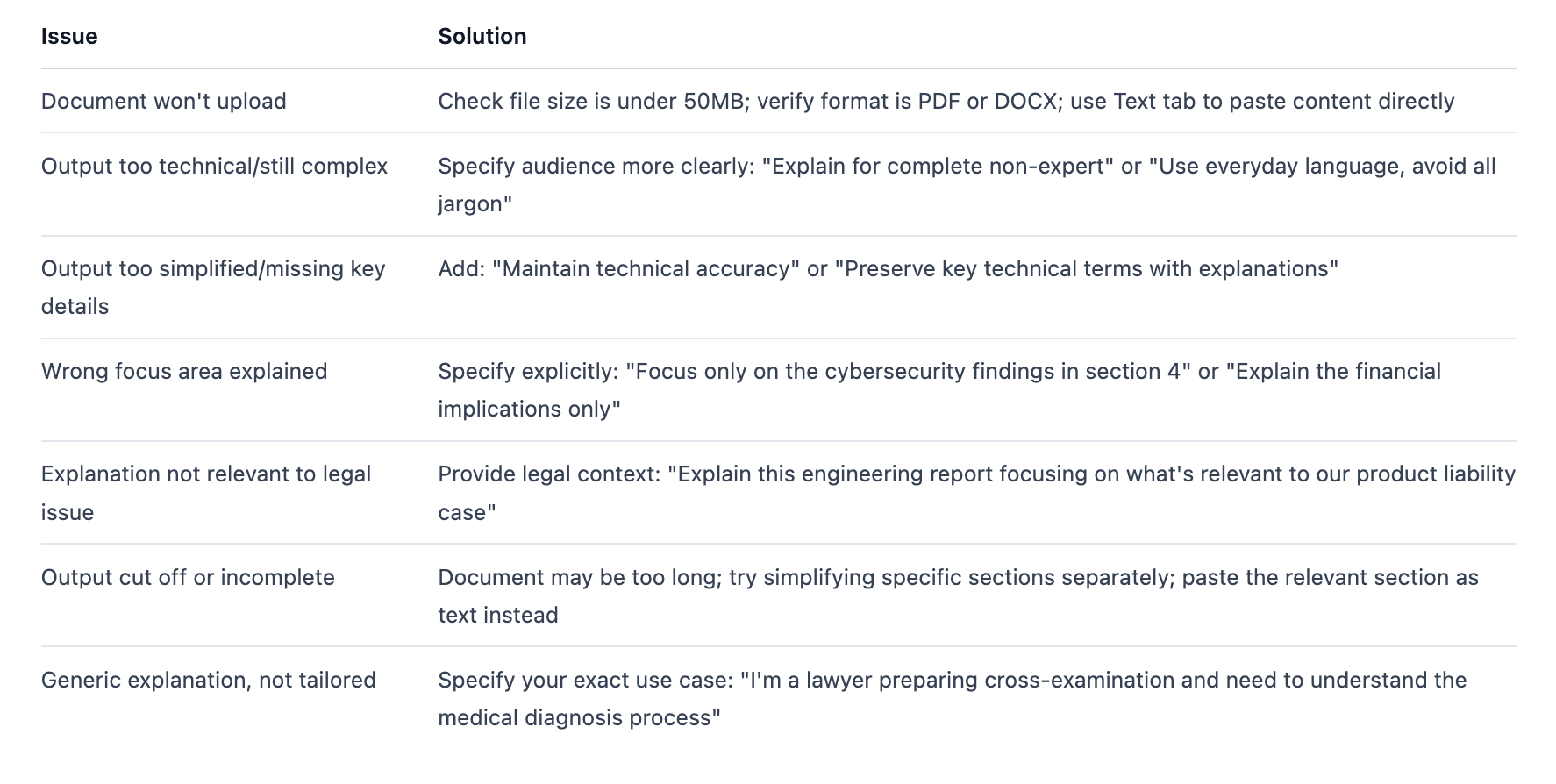
Next steps:
For condensing/extracting information instead of explaining it, use the Summarize tool
For analysis or legal advice based on the simplified content, copy key points into a new Assistant conversation
For iteration and refinement, use the Assistant with the document attached
Save frequently used simplified explanations to your Library for future reference