.png)
Send us a quick email with a brief explanation. We will respond and resolve the issue as soon as possible.
Submit ticketIntegrations: Best Practices & Troubleshooting
1. Best Practices
Connecting integrations:
Start by connecting your most critical document repositories (templates, precedents)
Use granular scope selection; connect relevant sites or folders rather than entire environments
Coordinate with your team before connecting shared repositories
Organizing synced content:
Maintain clear folder structures in SharePoint; this structure carries over to casepal
Use descriptive folder and file names in your DMS for better searchability in casepal
Remove outdated or obsolete documents from your DMS; they'll automatically be removed from casepal
Administrator coordination:
Limit administrators to 1-3 people for easier coordination
Establish clear responsibility for managing integrations
Communicate with your team before making changes to connected scopes
Regularly review connected scopes to ensure only relevant documents are synced
Sync management:
Monitor sync status regularly to ensure connections are healthy
Check "Last sync" timestamp to verify recent updates
Address any sync issues promptly (see Troubleshooting)
Disable scopes you no longer need rather than leaving them connected
Allow time for document processing and indexing; large syncs may take time before documents become searchable
Security and access:
Remember that all users in your organization can access synced documents
If certain documents should remain restricted, do not include them in connected scopes
Use your DMS's native permissions for document-level security; casepal syncs based on scope, not individual permissions
Balancing integration vs. manual curation:
Consider connecting broad repositories for comprehensive access, or
Manually upload only the highest-quality, most relevant documents for a curated knowledge base
You can use both approaches: integrate for comprehensive access, and manually upload for premium precedents
Requesting additional integrations:
If you need a DMS not currently supported, contact your account executive or support@casepal.co
Integration is possible if the DMS supports the MCP framework and meets adoption or partnership criteria
Provide details about your DMS and use case to expedite evaluation
2. Troubleshooting
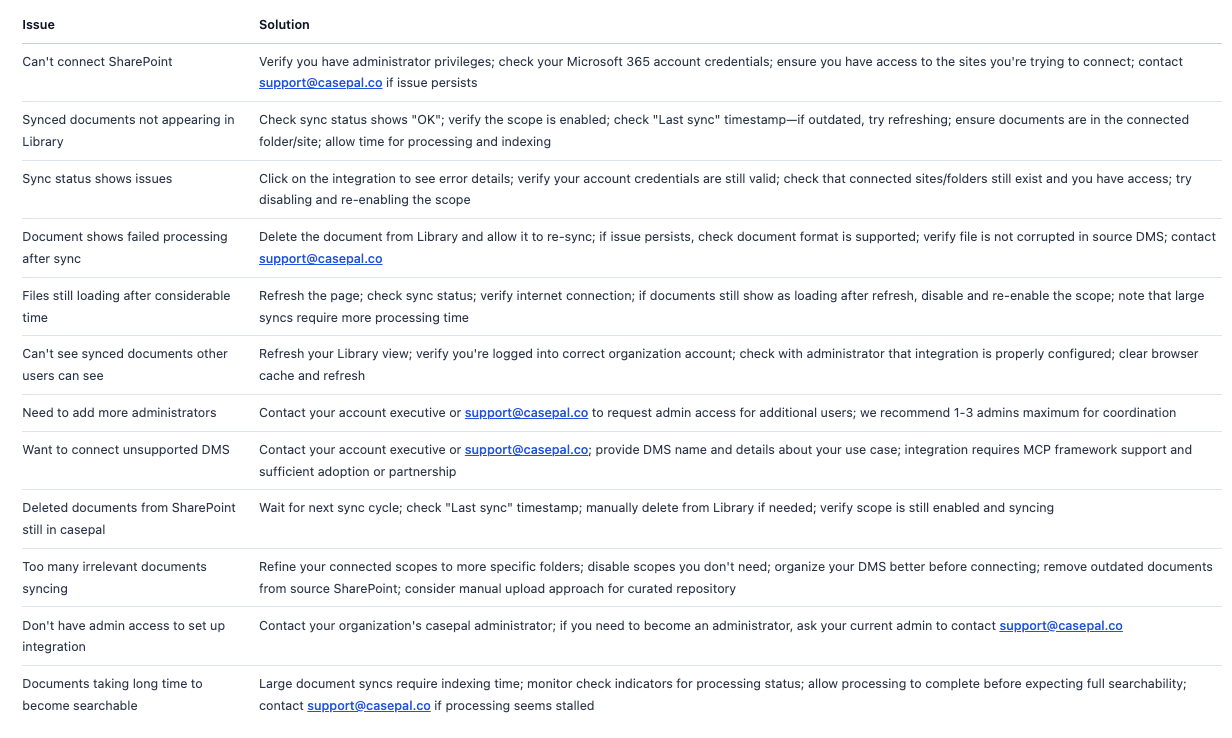
Next steps:
If you're an administrator, start by connecting your most critical document repository (e.g., templates folder)
Allow time for initial processing and indexing
Gradually expand connected scopes as you become comfortable with the integration
Regularly monitor sync status and maintain your connected repositories
For integration support or requests for additional DMS platforms, contact your account executive or support@casepal.co
Need help?
For integration setup assistance: support@casepal.co
To request admin access: Contact your account executive or support@casepal.co
To request support for additional DMS platforms: Contact your account executive or support@casepal.co
For best practices on using synced documents: See the Library guide