.png)
Send us a quick email with a brief explanation. We will respond and resolve the issue as soon as possible.
Submit ticketAssistant Tips & Troubleshooting
Refreshing Conversations
If the Assistant takes too much time to respond or start reasoning, refresh your conversation:
When to refresh:
The Assistant is taking unusually long to begin reasoning or generate a response
The page appears unresponsive or stuck
Reasoning has stopped progressing through phases
How to refresh:
Click the refresh button in your browser
The conversation will reload with all prior context preserved
You can continue from where you left off without losing your work
Avoid Long Chats
Start a new chat when your current conversation has accumulated very high context. Extended conversations with extensive content can impact response time and performance.
When to start a new chat:
The conversation has 20+ exchanges with lengthy responses
You've attached thousands of pages across multiple queries
The Assistant has performed numerous searches in a single conversation
You've asked many complex follow-up questions building on previous answers
Performance seems slower than usual
When to continue in the same chat:
Following up on the same question or matter
Iterating on a draft or analysis where the Assistant needs prior context
Working on related aspects of the same issue
The conversation is still relatively short and focused
Handling Context
Provide context strategically to optimize the Assistant's performance.
Prioritize the most relevant sources:
Attach or select only the documents directly relevant to your query. More documents doesn't mean better results—focused, relevant sources produce higher quality analysis.
❌ Too many sources:
Attaching 20 documents "just in case" when only 3 are directly relevant to your question
✅ Relevant sources only:
Attaching the specific contract you need reviewed, your template for comparison, and the relevant correspondence about disputed terms
File size vs. content:
The number of pages and amount of text matters more than file size in MB. A 5MB PDF with 50 pages of dense text requires more processing than a 10MB presentation with 30 slides and many images.
Focus on text-rich, relevant content rather than file size alone.
Don't reattach documents:
The Assistant remembers all documents attached within a conversation. If you've already uploaded a contract in your first message, don't attach it again in your follow-up questions—simply reference it.
Example:
First message: [Attach contract] "Review this MSA for data processing terms"
Follow-up: "Now check the same contract for liability caps"
[No need to reattach — the Assistant already has it]
Pictures and OCR considerations:
Picture-heavy documents (presentations, marketing materials, infographics) contain less processable text and may not yield as much analytical value
Poor OCR quality from badly scanned documents can affect accuracy — if a scanned document isn't processing well, copy and paste the text directly instead
Charts, tables, and diagrams in images may not be fully captured — describe key data points in your prompt if they're critical to your question
Common Issues & Solutions
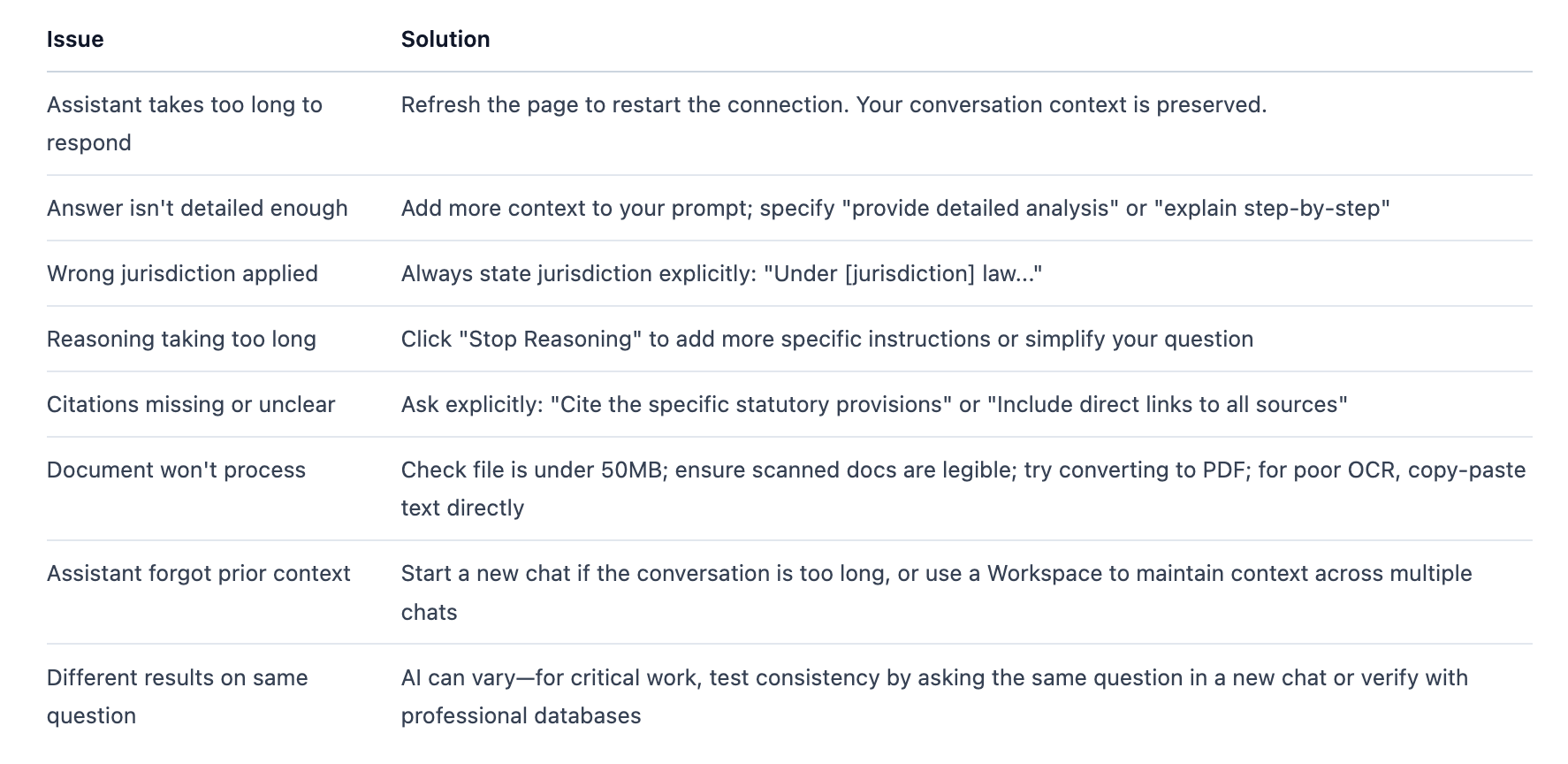
Legal Research: Case Law Retrieval
For legal research, especially case law, the ideal results are sometimes not publicly available on the web. Full-text judgments, older decisions, or cases from certain jurisdictions may not be accessible through open sources, which affects the Assistant's retrieval capabilities.
Solution:
Provide relevant case law as attachments. If you have access to the full judgment through Westlaw, LexisNexis, or your court filing system, attach it directly. The Assistant can then analyze the case in detail, extract key holdings, and apply the reasoning to your specific question.
Example:
[Attach judgment PDF from Westlaw]
Analyze the court's reasoning in this judgment on the doctrine of legitimate
expectations. How does it apply to our client's situation where the regulator
changed guidance after our client made substantial investments?
Enterprise Search: Library Quality
The performance of enterprise search is directly affected by the quality and organization of sources in your Library. Well-maintained, high-quality Library content produces better search results and more relevant answers.
Best practices for Library sources:
Avoid conflicting or outdated sources:
Remove superseded templates or policies when new versions are added
Archive outdated legal memos that no longer reflect current law
Don't keep multiple conflicting versions of the same document unless version control is intentional
Add repeatable, high-quality sources:
Upload your firm's current standard templates and playbooks
Include well-organized precedent files with clear naming conventions
Add approved internal memos and legal analysis
Ensure documents have clear metadata (client, matter, date, author)
Ask descriptive questions with semantics and keywords:
The Assistant searches your Library using both semantic understanding (meaning and context) and keyword matching. Effective Library search queries combine both.
❌ Vague query:
Find the IP clause
✅ Descriptive query with semantics and keywords:
Find our standard intellectual property assignment clause for software development agreements, specifically the provision on work-made-for-hire and assignment of moral rights
The descriptive query includes:
Semantics:"intellectual property assignment," "software development agreements," the concept of work-made-for-hire
Keywords: "IP," "assignment," "moral rights," "work-made-for-hire"
Context: The type of agreement and specific provision needed
This combination helps the Assistant retrieve the most relevant Library sources even if your firm uses different terminology in different documents.