.png)
Send us a quick email with a brief explanation. We will respond and resolve the issue as soon as possible.
Submit ticketWhat is casepal Library & When to Use Library
Centralize your organization's knowledge with searchable templates, precedents, memos, and matter files.
1. What is the Library?
Library is your organization's centralized knowledge repository. It stores and organizes templates, precedents, legal memos, case files, policies, and any other documents your team needs to access and reference. The Library integrates seamlessly with the Assistant and task-specific tools, enabling you to search, retrieve, and work with your institutional knowledge alongside external legal sources.
Use the Library for:
Standard templates and forms (contracts, clauses, policies)
Precedent transactions and filings
Internal legal memos and analysis
Matter files and case materials
Training materials and guides
Client playbooks and standards
Approved language and clauses
Any frequently referenced organizational documents
Collaborative knowledge creation:
Library is accessible to all users in your organization (unless configured otherwise), and all users can upload documents and contribute to building institutional knowledge. This collaborative approach ensures your Library grows organically as your team works, capturing precedents, templates, and insights across all practice areas and matters.
2. When to Use the Library
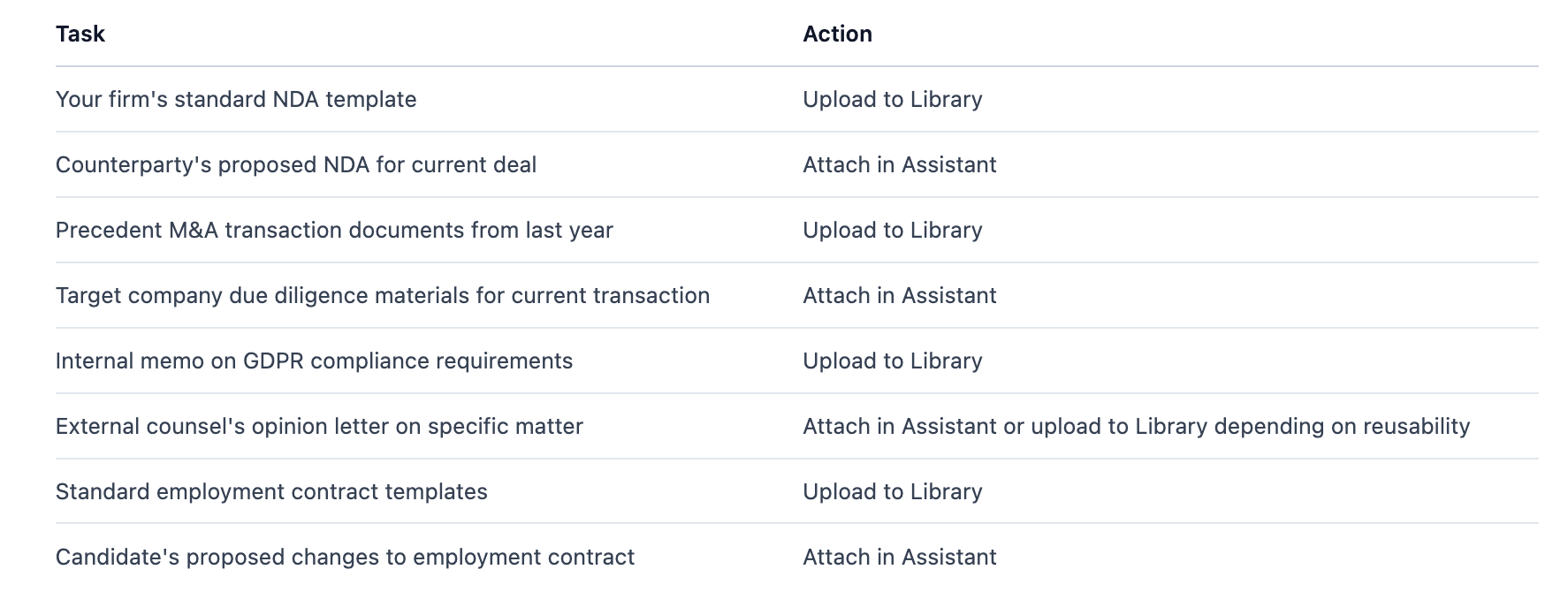
Upload to Library when:
Documents will be referenced or reused across multiple matters or tasks
You want documents to be searchable across your organization
Building institutional knowledge and precedent banks
Creating a centralized repository for templates and standard forms
Documents need to be accessible to multiple team members
Syncing documents from SharePoint or document management systems
Use attachments in Assistant/tools instead when:
Working with one-off external documents (counterparty contracts, client materials)
Documents are matter-specific and won't be reused
Quick analysis that doesn't require precedent research
Documents are confidential to a specific matter and shouldn't be in shared repository
Search Library when:
You need to find extracts across different documents
You need to find and analyze multiple relevant documents
You're researching how your organization has handled similar issues
You want comprehensive results across your knowledge base
The Assistant will determine relevancy and select the most appropriate sources
Use Library Picker when:
You need to work with the document as a whole
You already know which specific documents you need
You want to work with particular templates or precedents by name
You're browsing folders to select known documents
You need to reference specific matter files or client materials
Example decision points: